> ## Documentation Index
> Fetch the complete documentation index at: https://docs.stagewise.io/llms.txt
> Use this file to discover all available pages before exploring further.
# General agent settings — Editors, wake behavior, and notifications
> Configure general stagewise agent settings. Choose the editor used for opening files, keep the app awake while agents work, and customize notification sounds.
Open **Settings → Agent → General**.
## Open files in an editor
Choose which editor or file manager stagewise uses when you open files from agent chat, tool output, or diff review.
Supported options:
* **Cursor**
* **Zed**
* **VS Code**
* **Kiro**
* **Windsurf**
* **Trae**
* **Other**
Use **Other** when your preferred editor is not listed. stagewise stores this locally as your default editor choice.
## Keep app awake while agents work
Enable **Keep app awake while agents work** to prevent app suspension while an agent is actively running tool loops or other work.
Waiting for your response or waiting for tool approval counts as idle.
On macOS, preventing sleep on battery power or with the lid closed also requires **Keep awake** mode from the bottom-right corner of the sidebar.
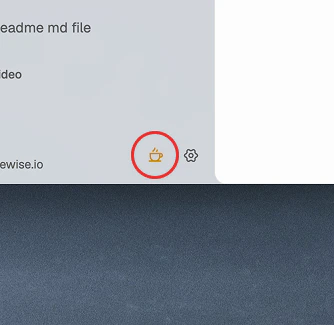 *Click the coffee cup icon in the sidebar to keep macOS awake while agents work.*
## Notification sounds
Notification sounds play when an agent finishes work, asks a question, or encounters an error.
### Loudness
Choose one of three levels:
| Level | Behavior |
| ---------- | --------------------------------- |
| **Off** | Disable notification sounds |
| **Subtle** | Play quieter notification sounds |
| **Loud** | Play stronger notification sounds |
### Sound pack
Select the active sound pack from the dropdown. The default pack is **Bubble Pops**. Click the preview button to hear the current sound.
### Custom sounds
Click **Use custom sound…** to import a custom sound pack. stagewise selects the imported pack after import succeeds.
## Dock icon bounce on macOS
On macOS, enable **Dock icon bounce** to bounce the dock icon when the agent finishes, asks a question, or encounters an error while the window is not focused.
## Related
* [Models & providers →](/reference/models-and-providers)
* [Keyboard shortcuts →](/reference/keyboard-shortcuts)
* [Diff review →](/reference/diff-review)
*Click the coffee cup icon in the sidebar to keep macOS awake while agents work.*
## Notification sounds
Notification sounds play when an agent finishes work, asks a question, or encounters an error.
### Loudness
Choose one of three levels:
| Level | Behavior |
| ---------- | --------------------------------- |
| **Off** | Disable notification sounds |
| **Subtle** | Play quieter notification sounds |
| **Loud** | Play stronger notification sounds |
### Sound pack
Select the active sound pack from the dropdown. The default pack is **Bubble Pops**. Click the preview button to hear the current sound.
### Custom sounds
Click **Use custom sound…** to import a custom sound pack. stagewise selects the imported pack after import succeeds.
## Dock icon bounce on macOS
On macOS, enable **Dock icon bounce** to bounce the dock icon when the agent finishes, asks a question, or encounters an error while the window is not focused.
## Related
* [Models & providers →](/reference/models-and-providers)
* [Keyboard shortcuts →](/reference/keyboard-shortcuts)
* [Diff review →](/reference/diff-review)