> ## Documentation Index
> Fetch the complete documentation index at: https://docs.stagewise.io/llms.txt
> Use this file to discover all available pages before exploring further.
# stagewise Docs — Open Source Agentic IDE
> stagewise is an open source agentic IDE. AI coding agents read, write, and modify files across your workspaces. Bring your own model, import existing subscriptions, or connect local models.
stagewise is a standalone desktop IDE where AI coding agents can read, write, and modify files across your workspaces. It combines a full browser engine with a powerful agent system that understands your project structure, uses your tools, and integrates with your stack.
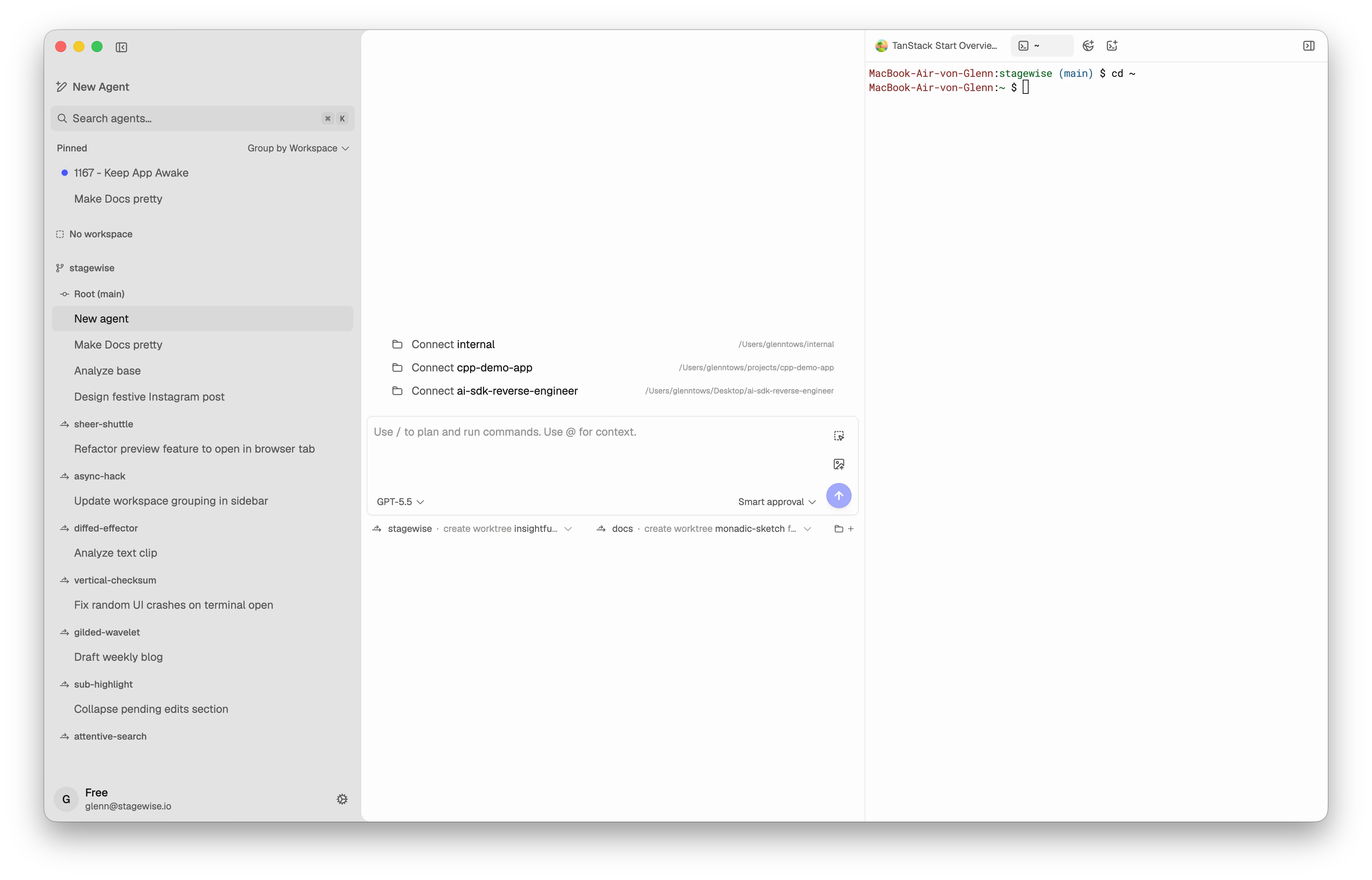 *The main stagewise workspace combines agents, connected folders, chat, and browser or terminal tabs in one window.*
## Bring your own intelligence
stagewise works with models from any provider. You have three options:
* **stagewise Account** — The fastest way to start. Access a large library of pre-configured models through the managed inference service. No API keys needed.
* **Import your subscriptions** — Already paying for Claude, GPT, Gemini, Kimi, Qwen, DeepSeek, GLM, or MiniMax? Bring your existing API keys and use them directly in stagewise.
* **Custom & local providers** — Connect self-hosted models via Ollama, LM Studio, OpenAI-compatible endpoints, OpenAI Responses endpoints, Anthropic-style endpoints, or other supported API styles. Full control, zero external API calls.
## What is stagewise?
stagewise is not a browser extension or editor plugin. It's a complete desktop agentic IDE:
* **AI coding agents** operate directly on your filesystem — reading, writing, editing, and searching code across multiple workspaces
* **Bring your own model** — Start instantly with the stagewise Account model library, import existing provider subscriptions, or run local models through Ollama, LM Studio, OpenAI-compatible endpoints, OpenAI Responses endpoints, Anthropic-style endpoints, or other supported API styles
* **Full browser engine** — Preview apps, select DOM elements as agent context, and browse while agents work
* **Multiple workspaces** — Connect several project folders at once so agents can work across your full stack
* **Skills & plugins** — Teach agents project-specific patterns with SKILL.md files, and integrate with Figma, GitHub, Supabase, PostHog, Vercel, and more
* **Design previews** — Iterate on visual changes before modifying real code
* **Diff review** — Accept, reject, or undo every agent edit with full inline diffs
* **Agentic by default** — Agents think, use tools, and act in a reasoning loop — not just autocomplete
## Who is stagewise for?
stagewise fits best when you need agents that work directly on your codebase with full context and real tools — not just inline suggestions.
| Profile | Why stagewise works |
| -------------------------------- | ------------------------------------------------------------------------------------------------------------------------------------- |
| **Full-stack developers** | Connect frontend and backend as separate workspaces, preview in the built-in browser, and let agents work across your entire stack. |
| **Teams with AI subscriptions** | Import existing provider API keys — no need to pay twice for the same models. |
| **Privacy-conscious developers** | Run models entirely on your machine with Ollama or LM Studio. Zero external API calls, full data sovereignty. |
| **Design-implementation teams** | Select elements visually, iterate with design previews, and integrate Figma designs directly into development workflows. |
| **Power users** | Create custom skills per project, chain slash commands, run multiple agents in parallel on different models, and extend with plugins. |
| **Open-source maintainers** | stagewise is AGPL-3.0 licensed. Self-hostable, auditable, and community-driven. |
## How the docs are organized
Download, install, and send your first prompt in minutes.
Understand how agents work, what workspaces are, and the mental model behind stagewise.
Detailed configuration guides for every feature and setting.
## Quick links
Download for macOS, Windows, or Linux.
Use existing provider API keys.
Connect Ollama, OpenAI-compatible, OpenAI Responses, Anthropic-style, and other custom endpoints.
Extend the agent with custom instructions and integrations.
Connect a workspace and start building.
*The main stagewise workspace combines agents, connected folders, chat, and browser or terminal tabs in one window.*
## Bring your own intelligence
stagewise works with models from any provider. You have three options:
* **stagewise Account** — The fastest way to start. Access a large library of pre-configured models through the managed inference service. No API keys needed.
* **Import your subscriptions** — Already paying for Claude, GPT, Gemini, Kimi, Qwen, DeepSeek, GLM, or MiniMax? Bring your existing API keys and use them directly in stagewise.
* **Custom & local providers** — Connect self-hosted models via Ollama, LM Studio, OpenAI-compatible endpoints, OpenAI Responses endpoints, Anthropic-style endpoints, or other supported API styles. Full control, zero external API calls.
## What is stagewise?
stagewise is not a browser extension or editor plugin. It's a complete desktop agentic IDE:
* **AI coding agents** operate directly on your filesystem — reading, writing, editing, and searching code across multiple workspaces
* **Bring your own model** — Start instantly with the stagewise Account model library, import existing provider subscriptions, or run local models through Ollama, LM Studio, OpenAI-compatible endpoints, OpenAI Responses endpoints, Anthropic-style endpoints, or other supported API styles
* **Full browser engine** — Preview apps, select DOM elements as agent context, and browse while agents work
* **Multiple workspaces** — Connect several project folders at once so agents can work across your full stack
* **Skills & plugins** — Teach agents project-specific patterns with SKILL.md files, and integrate with Figma, GitHub, Supabase, PostHog, Vercel, and more
* **Design previews** — Iterate on visual changes before modifying real code
* **Diff review** — Accept, reject, or undo every agent edit with full inline diffs
* **Agentic by default** — Agents think, use tools, and act in a reasoning loop — not just autocomplete
## Who is stagewise for?
stagewise fits best when you need agents that work directly on your codebase with full context and real tools — not just inline suggestions.
| Profile | Why stagewise works |
| -------------------------------- | ------------------------------------------------------------------------------------------------------------------------------------- |
| **Full-stack developers** | Connect frontend and backend as separate workspaces, preview in the built-in browser, and let agents work across your entire stack. |
| **Teams with AI subscriptions** | Import existing provider API keys — no need to pay twice for the same models. |
| **Privacy-conscious developers** | Run models entirely on your machine with Ollama or LM Studio. Zero external API calls, full data sovereignty. |
| **Design-implementation teams** | Select elements visually, iterate with design previews, and integrate Figma designs directly into development workflows. |
| **Power users** | Create custom skills per project, chain slash commands, run multiple agents in parallel on different models, and extend with plugins. |
| **Open-source maintainers** | stagewise is AGPL-3.0 licensed. Self-hostable, auditable, and community-driven. |
## How the docs are organized
Download, install, and send your first prompt in minutes.
Understand how agents work, what workspaces are, and the mental model behind stagewise.
Detailed configuration guides for every feature and setting.
## Quick links
Download for macOS, Windows, or Linux.
Use existing provider API keys.
Connect Ollama, OpenAI-compatible, OpenAI Responses, Anthropic-style, and other custom endpoints.
Extend the agent with custom instructions and integrations.
Connect a workspace and start building.